Starting Price
$8/mo
Rating
7/10
Best For
Freelance writers, Small businesses
Category
AI Writer
Pros & Cons
Pros
- ✓ Free tier with 10K characters/month, no credit card required
- ✓ 40+ use cases with dedicated product description mode
- ✓ 20+ tone presets change output personality with one click
- ✓ Unlimited plan at $7.50/mo (yearly) is the cheapest paid AI writer we've tested
- ✓ Clean, minimal interface with zero learning curve
- ✓ Chrome extension for writing anywhere
Cons
- ✗ Output quality is noticeably below Koala AI and Jasper for longer content
- ✗ 10K character free limit is tight (roughly 2-3 product descriptions)
- ✗ No SEO optimization features whatsoever
- ✗ MyVoice custom tone profiles locked behind paid plans
- ✗ Short-form focus that struggles with blog posts over 500 words
- ✗ No integrations beyond Chrome extension (no WordPress, no API on free tier)
Rytr (also written as Rytr.me, Rytr AI, or simply Rytr) has been around since 2021, which makes it ancient by AI writing standards. It’s survived multiple waves of new competitors by doing one thing consistently: being the cheapest option that still produces usable output. With 8 million users and a 4.9/5 rating across review platforms, there’s clearly an audience for “good enough at the right price.”
We signed up for the free tier and put Rytr through the same tests we use for every AI writer we review (product descriptions, short-form copy, and tone consistency) to find out whether the cheapest AI writer on the market is a smart budget pick or a false economy.
Short answer: it depends entirely on what you need. Here’s the full breakdown.
Rytr Review Summary
Our rating: 7/10. Rytr is the best free AI writer we’ve tested and the cheapest paid option worth using at $7.50/mo. The product description output is genuinely publishable with light editing, and the 20+ tone presets are a unique advantage. Its weakest point is long-form content: there’s no one-click article generator and zero SEO features. It’s the right pick for freelancers, small business owners, and anyone who needs quick short-form copy on a tight budget. Skip Rytr if you need blog articles or SEO-optimized content. Koala AI at $9/mo covers that workflow better.
What Is Rytr?
Rytr is a short-form AI writing assistant built around use-case templates. You pick a use case (product description, blog outline, email, ad copy), select a tone, provide your inputs, and Rytr generates content in seconds. It supports 35+ languages and 20+ writing tones out of the box.
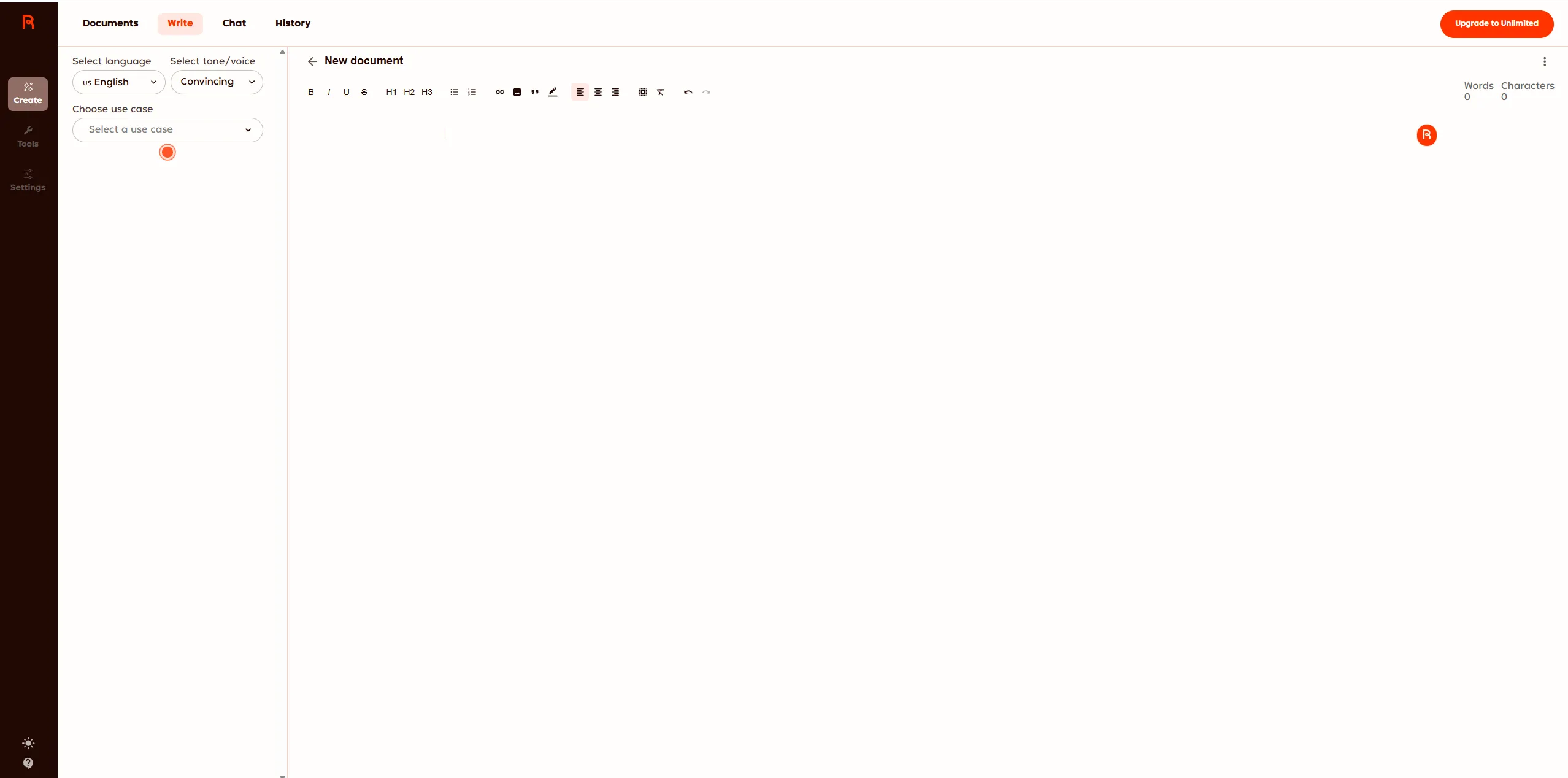
Unlike tools like Koala AI or Jasper that focus on long-form articles, Rytr is optimized for bite-sized content: descriptions, taglines, emails, social posts. The editor is intentionally simple: a clean document view with basic formatting tools and a sidebar for configuring your generation.
The platform also includes an AI chat feature and a Chrome extension for writing directly in other apps. Premium users get access to MyVoice, custom tone profiles that train the AI on your brand’s writing style.
Core Features Deep-Dive
Use Case Templates: The Main Workflow
Rytr’s interface revolves around its use case selector. There are 40+ templates covering everything from product descriptions and blog outlines to video ideas and business pitches. You can also create custom use cases on the Premium plan.
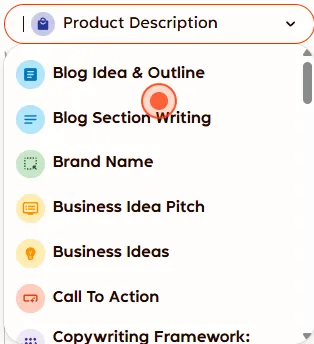
The use case approach has a clear advantage for beginners: you don’t need to know how to write a good AI prompt. Pick “Product Description,” fill in the product name and features, and Rytr handles the rest. It’s more guided than tools that drop you into a blank editor and expect you to engineer your own prompts.
The limitation is flexibility. Long-form content like full blog articles isn’t a use case. You get “Blog Section Writing” and “Blog Idea & Outline” as separate templates, but there’s no one-click article generator like KoalaWriter. Building a complete blog post means generating section by section and stitching it together manually.
Product Description Test: The Merino Wool Comparison
We ran our standard test: generating a product description for a Merino Wool Quarter-Zip Pullover using the same inputs we gave Koala AI, Jasper, and Writesonic in our best AI writer for Shopify product descriptions roundup.
Input we provided:
- Product name: Merino Wool Quarter-Zip Pullover
- Key features: 100% merino wool, moisture-wicking, temperature regulating, machine washable, quarter-zip collar
- Target audience: Men looking for versatile layering pieces for work and weekend
Rytr’s output (Thoughtful tone):
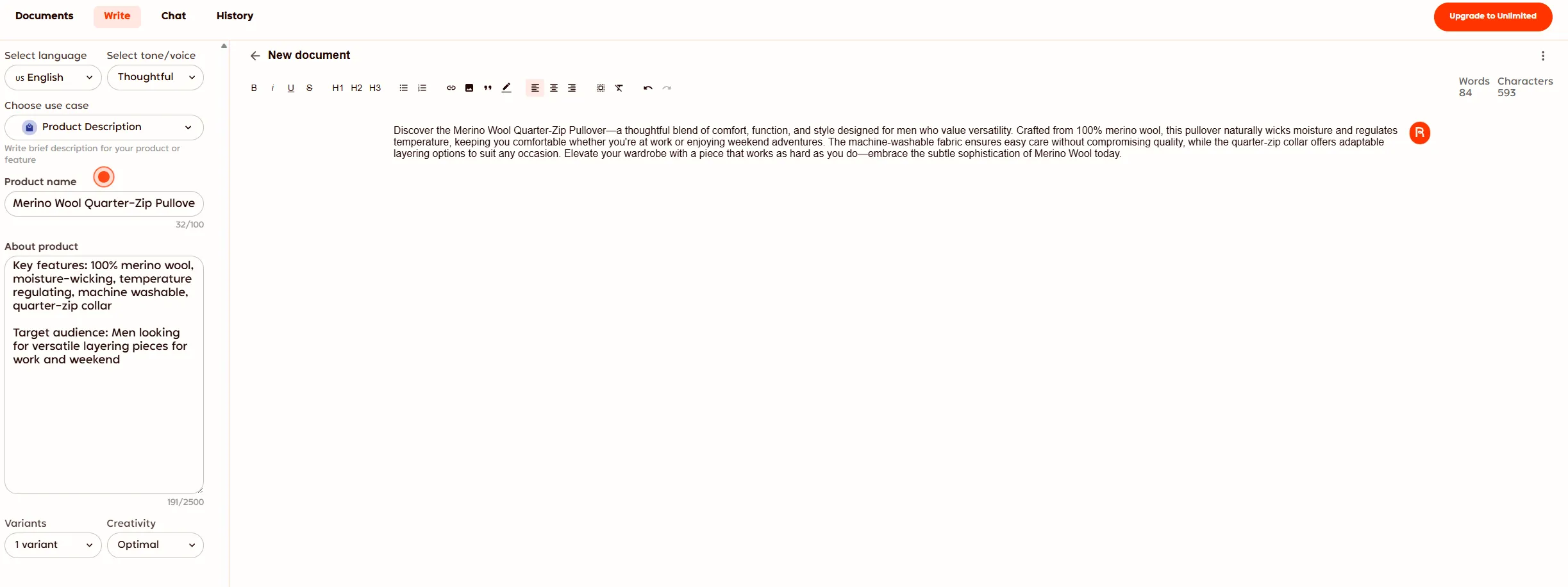
The result came in at 84 words: a concise, single-paragraph description that hit all the key features. The “Thoughtful” tone produced copy that read like a mid-tier e-commerce product page: competent, accurate, and ready to publish with minor tweaks. It correctly highlighted moisture-wicking, temperature regulation, and the work-to-weekend versatility angle.
How it compares: Koala AI’s output for the same product was more polished, with better sentence variety, a stronger opening hook, and a more natural flow. Jasper’s had the most personality with its brand voice feature. Rytr’s output was serviceable but noticeably more formulaic. For $0 (free tier) or $7.50/mo, though, “serviceable and accurate” is a fair trade.
Tone Switching: Rytr’s Differentiator
Where Rytr genuinely stands out is tone flexibility. Switching from “Thoughtful” to “Assertive” completely changed the output personality. The assertive version was punchier, more direct, and used stronger action verbs. We generated three variants with the assertive tone and each one had a distinct angle.
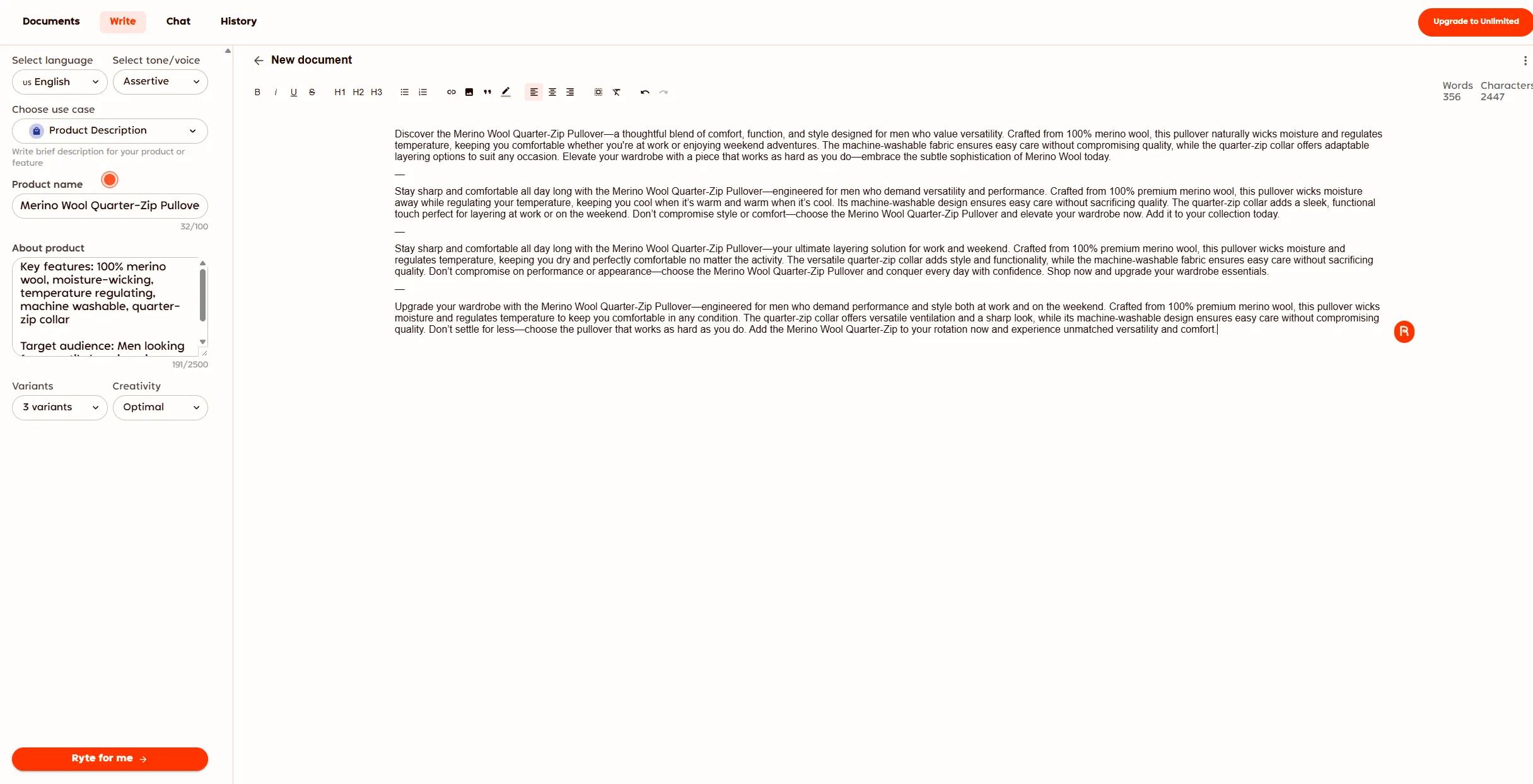
With 20+ tone presets (Convincing, Casual, Formal, Humorous, Assertive, Thoughtful, and more), you can quickly test different angles for the same product. This is genuinely useful for A/B testing ad copy or finding the right voice for different audiences. No other tool at this price point offers this kind of tone variety out of the box.
MyVoice: Custom Brand Tones (Paid Only)
The MyVoice feature lets you create custom tone profiles by describing your brand’s style, target audience, and content guidelines. It’s Rytr’s answer to Jasper’s brand voice feature, but at a fraction of the cost.
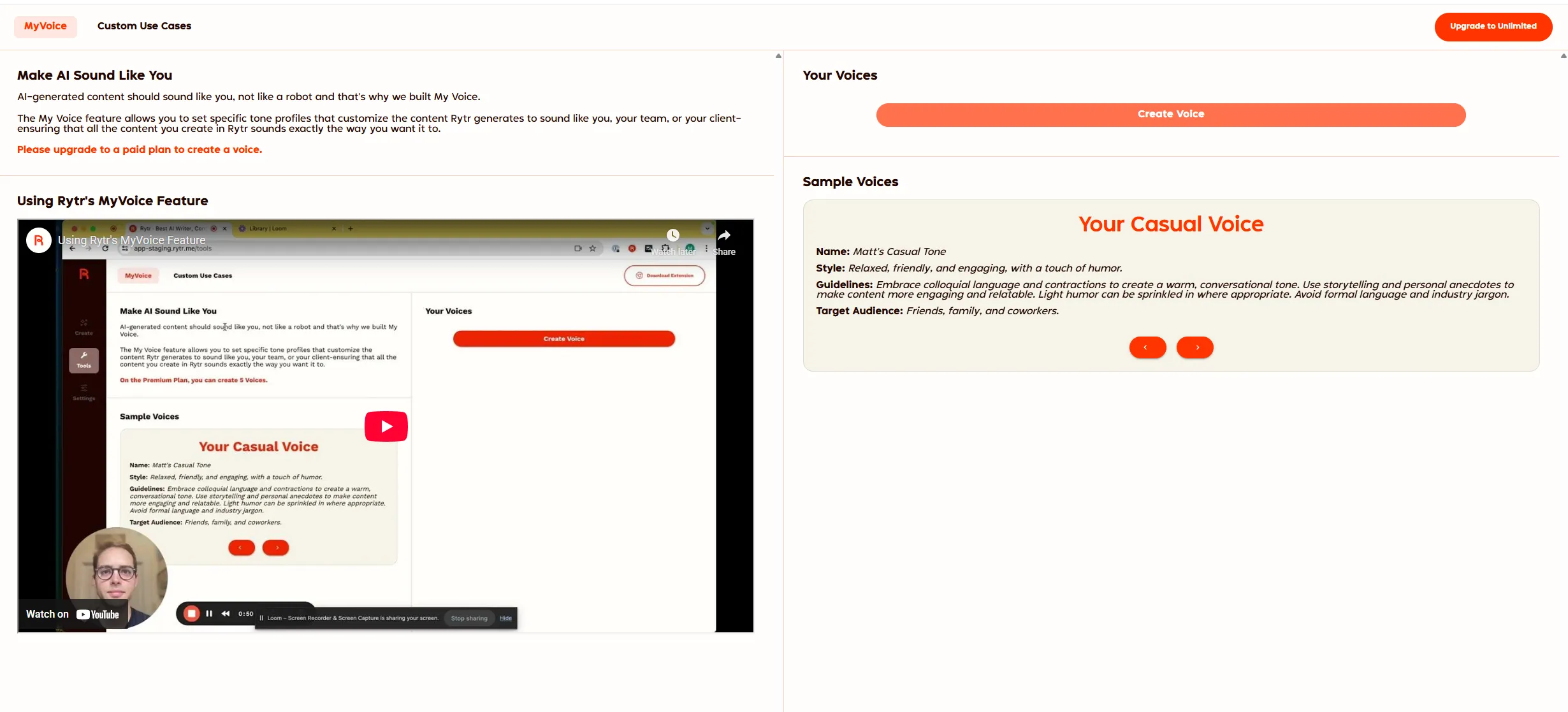
The catch: MyVoice is locked behind the paid plans. The Unlimited plan ($7.50/mo) gets you one custom voice. Premium ($24.17/mo) gets five. If custom voice profiles are essential to your workflow, the Unlimited plan is the minimum viable option.
We couldn’t test MyVoice on the free tier, but the concept is sound. If you’re a freelancer writing for multiple clients, having saved tone profiles for each client would save real time versus manually adjusting tone settings every generation.
AI Chat
Rytr includes a chat feature similar to ChatGPT. It’s functional for quick brainstorming and research, but it’s not differentiated enough to be a selling point. You’d use ChatGPT or Claude for serious conversational AI work. The chat is a nice bonus, not a reason to choose Rytr.
Pricing Breakdown
Rytr offers three tiers, and the free tier is genuinely free, no credit card required:
| Plan | Monthly Price | Yearly Price | Characters/Month | Key Features |
|---|---|---|---|---|
| Free | $0 | $0 | 10,000 | 40+ use cases, 20+ tones, AI Chat, Chrome extension |
| Unlimited | $9/mo | $7.50/mo | Unlimited | 1 custom voice, 50 plagiarism checks, 2x character limits |
| Premium | $29/mo | $24.17/mo | Unlimited | Premium AI model, 30+ languages, 5 custom voices, 100 plagiarism checks, custom use cases |
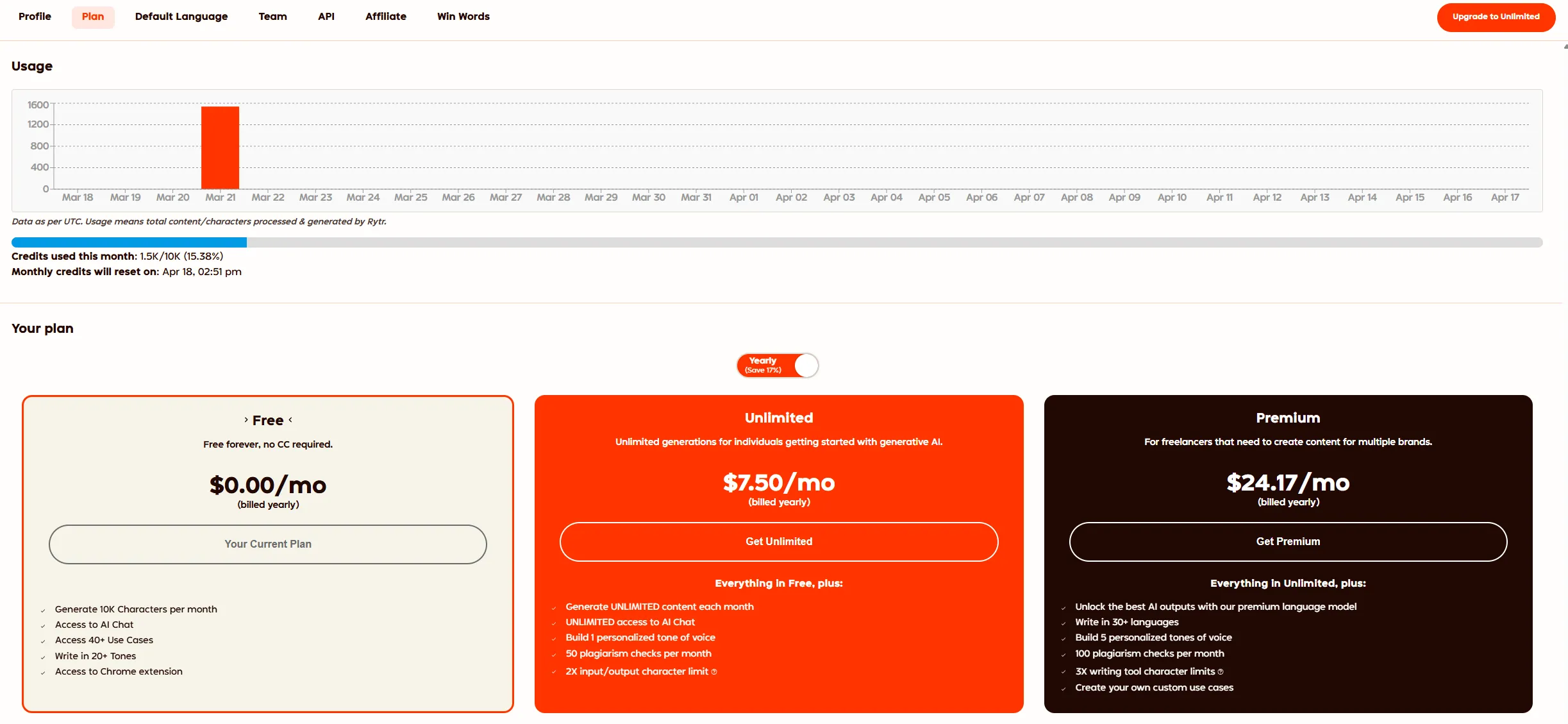
The free tier gives you 10,000 characters per month. That’s roughly 2-3 product descriptions or 4-5 short email drafts. Enough to test whether Rytr works for you, but not enough for sustained production use.
The Unlimited plan at $7.50/mo (yearly) is the sweet spot. Unlimited generations, a custom voice profile, and plagiarism checking for less than a fancy coffee. This is the cheapest paid AI writer we’ve tested. Koala AI starts at $9/mo, Writesonic at $16/mo, and Jasper at $49/mo.
The Premium plan at $24.17/mo (yearly) unlocks the premium language model, more custom voices, and the ability to create your own use cases. At this price point, though, you’re approaching Koala AI Professional ($49/mo) and Frase Starter ($49/mo) territory where the output quality and feature depth are significantly higher.
What We Liked
The free tier is genuinely usable. No credit card, no trial expiration, no nagging upgrade popups on every click. You get 10K characters per month, access to all 40+ use cases, and the same 20+ tones as paid users. For someone who needs occasional AI-generated copy, this is a real option.
Tone variety is unmatched at this price. Twenty-plus tone presets with one-click switching is a workflow advantage. Generating the same product description in Thoughtful, Assertive, and Casual tones takes about 30 seconds total. Other tools require you to rewrite your prompt or adjust settings to achieve the same effect.
The interface is zero-friction. Pick a use case, fill in the fields, click generate. There’s no learning curve, no overwhelming dashboard, no feature overload. Rytr knows it’s a quick-generation tool and the UX reflects that. A non-technical small business owner could produce their first AI-generated description within two minutes of signing up.
Product description quality is solid for the price. The Merino Wool test output was accurate, covered all features, and needed only light editing. For Shopify stores with dozens of products and zero budget for AI tools, the free tier alone could save hours.
What Could Be Better
Output quality has a ceiling. Rytr’s product descriptions are accurate but formulaic. Sentences follow predictable patterns, openings tend to use the same “Discover the…” or “Stay comfortable…” structures, and the copy lacks the personality and variety you get from Koala AI ($9/mo) or Jasper ($49/mo). For a single product description, this is fine. For 50 descriptions that need to feel distinct, the repetition becomes noticeable.
Long-form content is a weak spot. There’s no article generator. Building a blog post means generating individual sections and manually assembling them, which defeats the time-saving purpose. If blog content is your primary need, Koala AI’s one-click article generation is worth the extra $1.50/mo over Rytr’s Unlimited plan.
No SEO features. Zero. No keyword targeting, no SERP analysis, no content scoring, no optimization suggestions. Rytr generates copy. It doesn’t help you rank. If SEO matters to your workflow, you’ll need to pair Rytr with a dedicated tool like Frase ($49/mo) or Surfer SEO ($49/mo). At that point, the budget advantage disappears entirely.
Free tier character limits are restrictive. 10,000 characters sounds like a lot until you realize a single 500-word blog section is roughly 3,000 characters. You’ll burn through the free allowance fast if you’re doing anything beyond occasional use.
No WordPress integration or API on free. Koala AI includes WordPress integration and API access on its $9/mo plan. Rytr’s free tier only offers the Chrome extension. The paid tiers don’t add much in terms of integrations either. There’s no direct publishing to CMS platforms.
How Rytr Compares to Alternatives
Rytr vs. Koala AI ($9/mo): This is the real comparison for budget buyers. Koala AI costs $1.50/mo more than Rytr Unlimited and delivers meaningfully better long-form content, built-in SEO optimization, and WordPress integration. For product descriptions specifically, Koala’s output is more polished but Rytr’s is acceptable. If you only need short-form copy, Rytr saves you $1.50/mo; if you need blog articles or SEO content, Koala is the clear winner. Full breakdown: Koala AI vs Rytr.
Rytr vs. Frase ($49/mo Starter): Frase is an SEO content platform with brief generation, SERP analysis, optimization scoring, GEO score, and AI Visibility tracking that Rytr completely lacks. Rytr is a short-form AI writer with no SEO features. If your workflow is “generate quick copy and email drafts,” Rytr saves real money at $7.50/mo vs $49/mo; if your workflow involves ranking in Google or being cited by ChatGPT, Perplexity, Claude, or Gemini, Frase is the only real option between the two. Details: Frase vs Rytr.
Rytr vs. Writesonic ($16/mo): Writesonic costs twice as much but offers a broader feature set, including article writer, AI images, landing page copy, and more template variety. Writesonic’s bulk generation is better for high-volume stores. Rytr wins on price; Writesonic wins on capability.
Rytr vs. Jasper ($49/mo): Different leagues. Jasper’s brand voice, team collaboration, and long-form quality are in a different category entirely. Rytr’s MyVoice feature is a budget approximation of Jasper’s brand voice, but the depth isn’t comparable. Choose Rytr if you need quick, cheap copy. Choose Jasper if content is a core business function.
Rytr vs. ChatGPT: This is the question Rytr has to answer in 2026. ChatGPT’s free tier can generate product descriptions, blog sections, and email copy too, arguably with more flexibility since you write your own prompts. Rytr’s advantage is structure: the use case templates and tone presets remove the prompt engineering step. For non-technical users who don’t want to learn prompting, Rytr is more approachable.
Who Should Use Rytr?
Freelancers juggling multiple clients. The free tier handles occasional copy needs, the tone presets let you match different client voices quickly, and the price lets you keep overhead near zero while building your business.
Small business owners writing their own copy. If you need product descriptions, social media posts, or email drafts and your budget for AI tools is genuinely $0-10/mo, Rytr is built for you.
Anyone who wants to test AI writing before committing. The no-credit-card free tier is a zero-risk way to see whether AI-generated content fits your workflow.
Who Should Skip Rytr?
Bloggers and content marketers. If you’re producing blog articles, Koala AI at $9/mo is the better investment, with one-click articles, SEO features, and higher output quality for $1.50/mo more.
SEO professionals. Rytr has zero SEO capability. Pair it with Frase or Surfer SEO, or choose a tool that bundles both writing and optimization like Outranking ($19/mo).
Teams and agencies. No collaboration features, no shared workspaces, no role-based access. Jasper or Narrato are better fits for multi-person content operations.
Rytr Review: Final Verdict
Rytr earns a 7/10 from us. It’s not the best AI writer. It’s the best free AI writer, and the cheapest paid option worth using. The product description output is genuinely publishable with light editing, the tone presets are a unique advantage, and the interface wastes zero time.
The points it loses are on quality ceiling (output gets repetitive across multiple generations), feature depth (no SEO, no long-form, no integrations), and the limitations of the free tier (10K characters disappears fast). At $7.50/mo for Unlimited, Rytr is fair value. At $24.17/mo for Premium, you’re better off spending the extra few dollars on Koala AI or Frase, which offer meaningfully more for similar money.
Start with Rytr if: You need quick, cheap copy and your budget is literally $0-8/mo. The free tier is a legitimate starting point.
Upgrade past Rytr when: You need blog articles, SEO optimization, or output quality that doesn’t require editing every paragraph. That’s when Koala AI ($9/mo) or Frase ($49/mo Starter) start earning their price difference.
Pricing and features verified as of March 2026. Rytr updates its plans periodically. Check their pricing page for the latest. This review reflects our hands-on experience and may include affiliate links that support QuillScout at no additional cost to you.
Frequently Asked Questions
Is Rytr worth it in 2026?
How much does Rytr cost?
How does Rytr compare to Koala AI?
Can Rytr write blog posts?
Does Rytr support multiple languages?
What are the best Rytr alternatives?
Does Rytr have a Chrome extension?
Does Rytr offer a lifetime deal?
About Alex Rivera
Alex Rivera is the lead reviewer at QuillScout. Every tool we cover is tested hands-on across real production work before a review is published. Reviews are updated when product changes warrant it, and we maintain a strict no-em-dash, no-AI-fluff editorial standard so readers get an honest signal, not generated copy.
Our Verdict
Rytr is the best free AI writer we've tested and a solid ultra-budget option at $7.50/mo. The product description output is genuinely usable. Our Merino Wool test needed only light editing. But the quality ceiling is lower than Koala AI ($9/mo), and the lack of SEO features means it's a writing tool, not a content strategy tool. Best for freelancers, side hustlers, and small business owners who need quick copy without a monthly commitment.
This review contains affiliate links. See our affiliate disclosure for details.