If you manage content at any scale, you already know: the brief makes or breaks the article. A vague brief leads to rewrites, missed keywords, and content that never ranks. A sharp brief leads to first-draft quality that actually hits page one.
The problem? Traditional content briefs take forever. We’re talking 1-2 hours of manual SERP analysis, competitor scanning, question research, and outline building — per article. Multiply that by 20 pieces a month and you’ve burned an entire work week just on briefs.
AI tools have changed the math completely. Here’s the exact workflow we use to produce comprehensive SEO content briefs in about 10 minutes flat.
Why Content Briefs Matter More Than You Think
A content brief is the strategic document that sits between your keyword research and your first draft. It tells the writer (or AI writing tool) exactly what to cover, how to structure it, what questions to answer, and what targets to hit.
Without a brief, you’re guessing. With a brief, you’re engineering rankings.
Good briefs reduce:
- Revision cycles — Writers know what’s expected upfront
- Keyword gaps — You catch missing subtopics before publishing
- Thin content — Word count and depth targets are baked in
- Wasted budget — Fewer rewrites means fewer billable hours
For agencies and in-house teams producing 10+ articles per month, briefs aren’t optional. They’re the difference between a content operation that scales and one that stalls.
The Old Way: Manual SERP Analysis (1-2 Hours Per Brief)
Before AI brief generators existed, building a proper brief looked something like this:
- Google your target keyword and open the top 10 results in separate tabs
- Read each article, noting headings, subtopics, and unique angles
- Check “People Also Ask” and related searches for question data
- Cross-reference with a keyword tool to find secondary keywords and search volume
- Manually build an outline by synthesizing patterns across competitors
- Set word count targets based on competitor averages
- Write notes for the writer explaining tone, audience, and CTA goals
This process works. It produces good briefs. But it takes 60-120 minutes per keyword, and it doesn’t scale when you’re managing content calendars with dozens of articles per month.
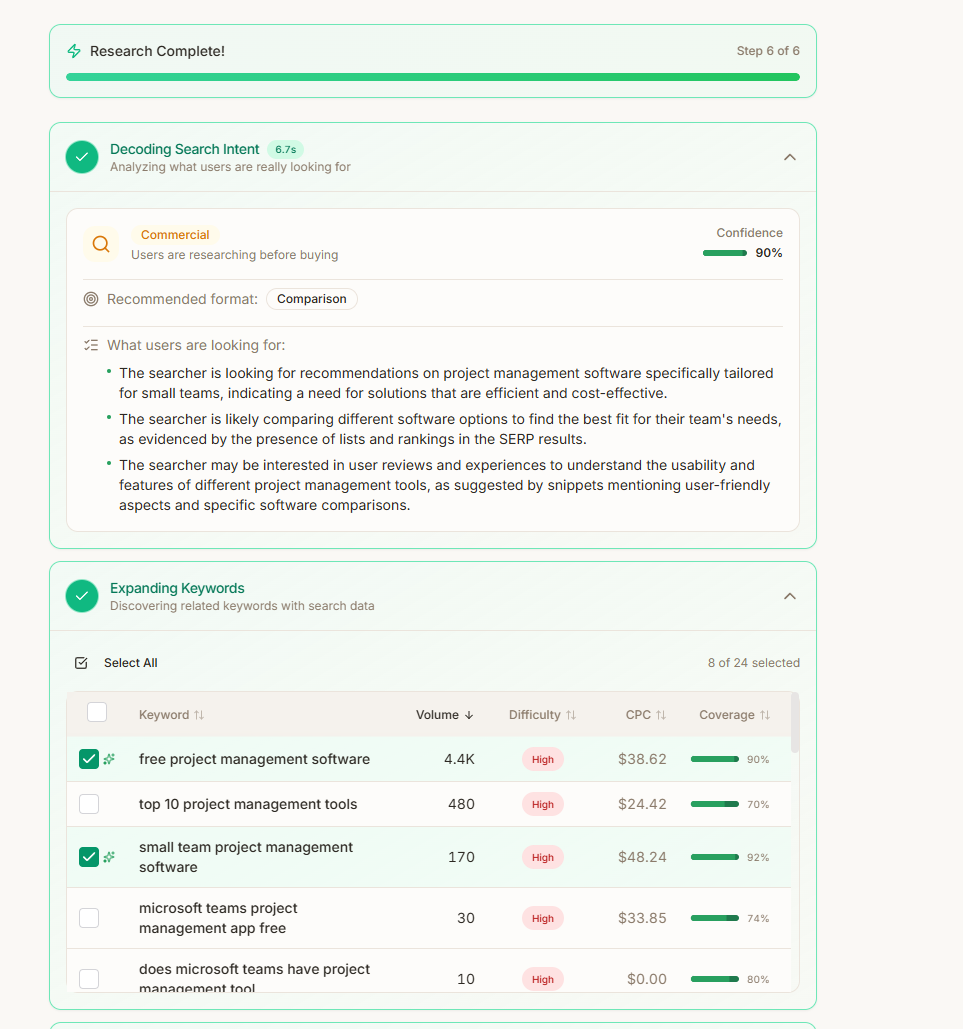
The AI-Powered Workflow: 10 Minutes, Start to Finish
Here’s the streamlined process using AI-powered brief generators. We’ll walk through it step by step.
Step 1: Enter Your Target Keyword (30 Seconds)
Open your brief generator — we recommend Frase.io for most teams or Surfer SEO for data-heavy workflows. Enter your primary keyword and select your target country and language.
The tool immediately begins analyzing the current SERP landscape for that query.
Step 2: Analyze SERP Results (2 Minutes)
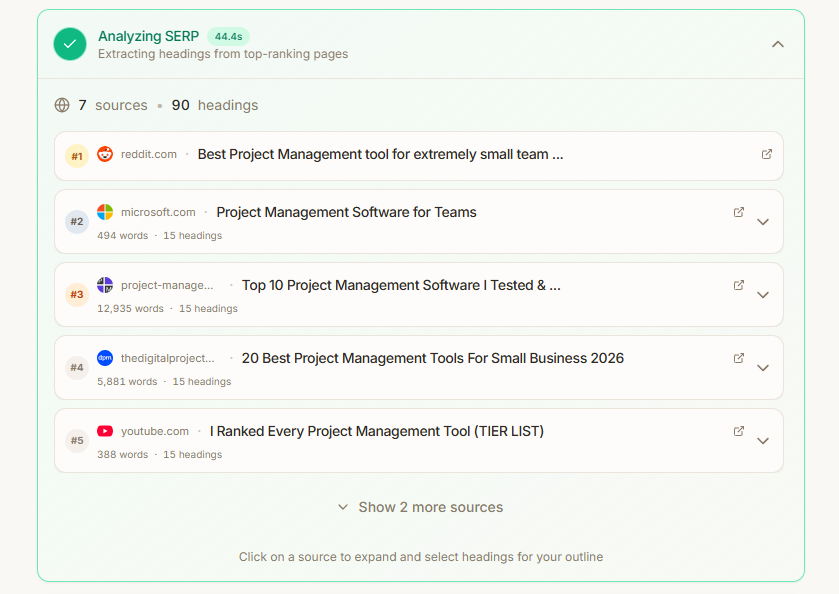
The AI pulls in the top 10-20 ranking pages and breaks them down automatically. You’ll see:
- Average word count across top results
- Common headings (H2s and H3s) used by competitors
- Domain authority and backlink profiles of ranking pages
- Content type distribution (listicles, how-tos, guides, etc.)
Review this data quickly. You’re looking for patterns: what are all the top results covering? What’s the dominant content format? Are there any outlier results ranking with a different angle?
This analysis would take 30-45 minutes manually. The AI does it in seconds.
Step 3: Pull Question Data (2 Minutes)
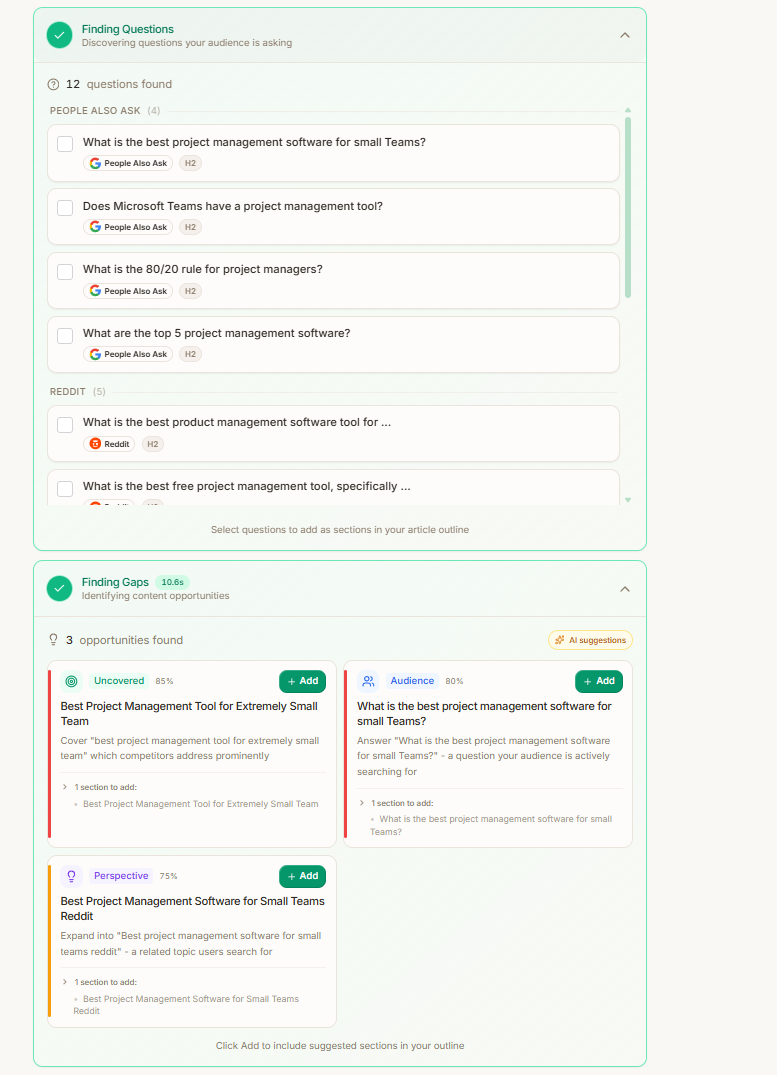
Next, review the automatically gathered questions. Good brief tools pull from:
- Google’s “People Also Ask” boxes
- Related searches and autocomplete suggestions
- Question patterns from Reddit, Quora, and forums
- Questions embedded in competitor content
In Frase, these appear in the “Questions” tab, already organized by relevance. Pick the 5-10 questions most relevant to your target audience and add them to your brief. These become H2s, FAQ sections, or content angles your writer needs to address.
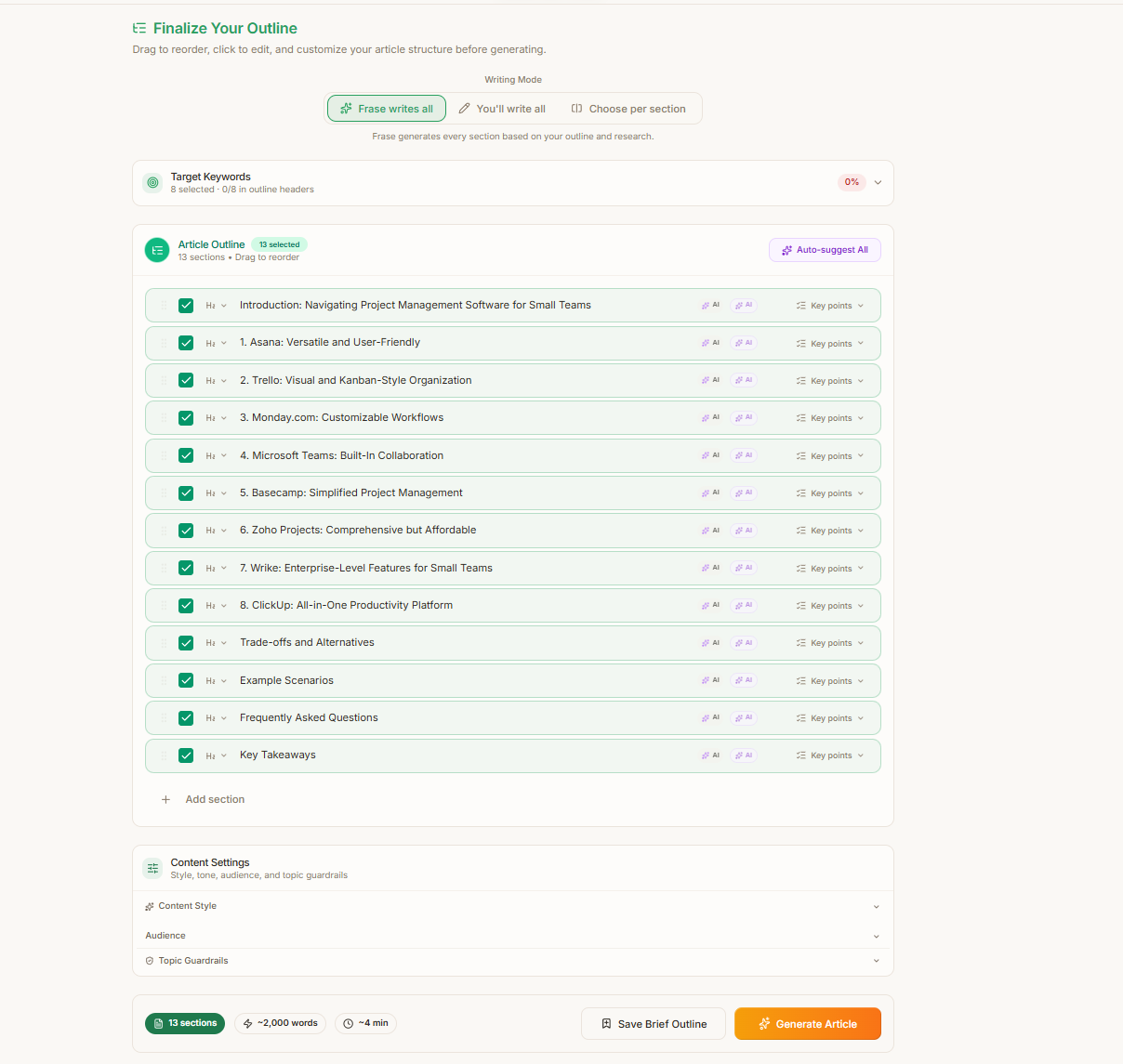
Step 4: Structure the Outline (3 Minutes)
This is the most important step, and the one where your editorial judgment matters most.
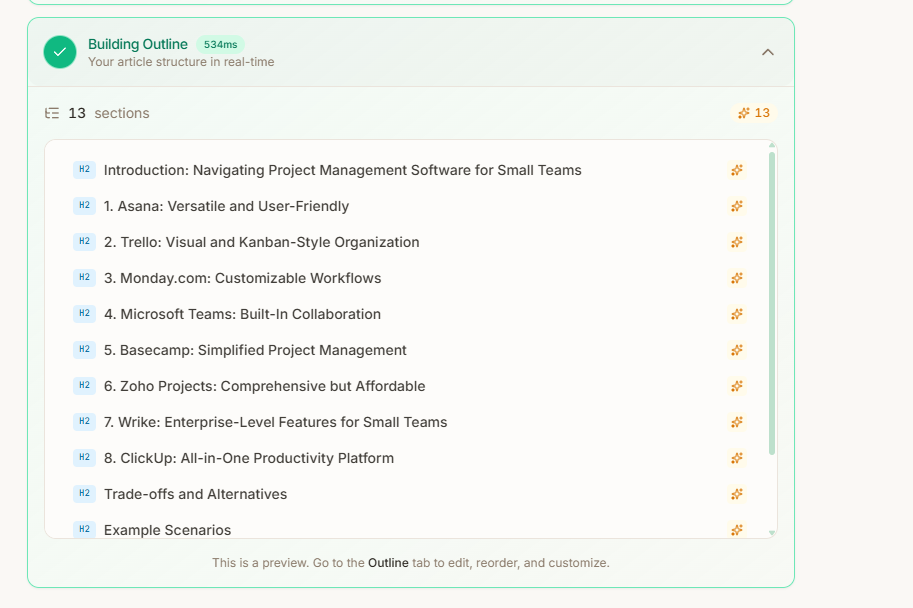
The AI will suggest an outline based on competitor analysis. Use it as a starting point, but customize it:
- Reorder sections to match your preferred narrative flow
- Remove generic headings that every competitor uses (differentiation matters)
- Add unique sections based on your expertise or data that competitors missed
- Include specific instructions under each heading — don’t just list H2s, tell the writer what each section should accomplish
A good outline has 5-8 H2 sections, each with 2-3 bullet points explaining what to cover. Think of it as a skeleton that a writer can flesh out without needing to ask clarifying questions.
Step 5: Set Optimization Targets (1 Minute)
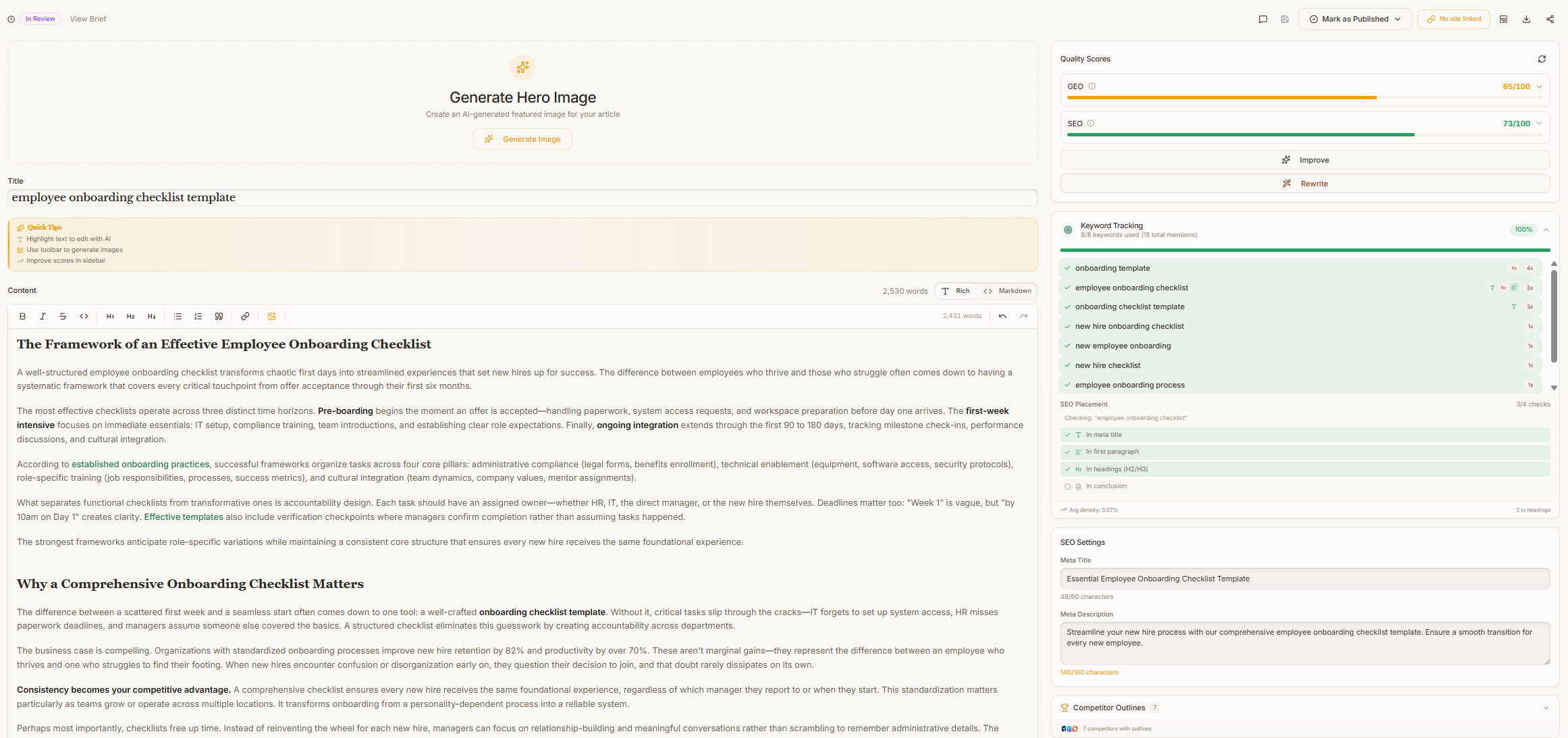
Based on the SERP analysis, set concrete targets:
- Word count range: Usually the average of top 5 results, plus 10-20% (e.g., if competitors average 1,800 words, target 2,000-2,200)
- Key terms to include: The AI identifies semantically related terms that top results use — aim for the top 20-30
- Internal links: Specify 2-3 internal pages to link to
- External links: Note any authoritative sources to reference
- Content score target: In Surfer SEO, aim for 70+ on the content score; in Frase, target the green zone on the topic score
Step 6: Export to Writer (1 Minute)
Export the completed brief as a Google Doc, PDF, or directly into your project management tool. Most AI brief generators support:
- Google Docs integration
- Notion or Asana export
- Shareable link
- Copy to clipboard (for pasting into your CMS)
Include a short “context paragraph” at the top of the brief: who is this article for, what stage of the funnel, and what action should the reader take after reading.
Which Tool Should You Use?
We’ve tested every major AI brief generator on the market. Here’s the short version (for the full breakdown, see our best AI SEO brief generators for agencies roundup):
Frase.io — Best for Most Teams
Frase strikes the best balance between speed, depth, and price. Its brief workflow is purpose-built: enter a keyword, get a full SERP analysis, question data, and outline suggestions in one unified interface.
Why Frase wins for briefs:
- Fastest time from keyword to finished brief
- Question research is best-in-class
- AI writer built in for drafting directly from briefs
- Affordable at $15/mo for the basic plan
- Clean interface that non-SEO team members can navigate
Frase is ideal for content marketing teams, freelance writers managing their own SEO, and agencies that need to produce briefs quickly without over-engineering the process.
Surfer SEO — Best for Data-Heavy Workflows
Surfer SEO is the better choice when you need granular NLP data, exact keyword density targets, and a real-time content scoring system that your writers optimize against as they draft.
Why Surfer wins for data teams:
- Content Editor with real-time optimization scoring
- NLP-powered term suggestions with recommended usage counts
- SERP Analyzer provides deep competitive intelligence
- Integrates with Google Docs and WordPress
- Better for teams that want writers to self-optimize during drafting
Surfer costs more ($49/mo for the Essential plan), but it’s worth it for agencies and in-house teams that produce 20+ articles per month and want tight optimization control.
SEO Brief Template
Here’s the template structure we use for every brief. Feel free to adapt it to your workflow:
## Content Brief: [Primary Keyword]

**Target Keyword:** [primary keyword]
**Secondary Keywords:** [3-5 related terms]
**Search Intent:** [informational / commercial / transactional]
**Target Word Count:** [range, e.g., 1,800-2,200]
**Target Audience:** [specific persona]
**Funnel Stage:** [awareness / consideration / decision]
**Content Score Target:** [if using Surfer or Frase]

### Outline

**H1:** [Title — include primary keyword]

**H2:** [Section 1]
- Cover [specific point]
- Include [data, example, or comparison]

**H2:** [Section 2]
- Address [audience pain point]
- Reference [source or tool]

[...repeat for 5-8 sections]

**H2:** FAQ
- [Question from PAA data]
- [Question from PAA data]
- [Question from PAA data]

### Internal Links
- [Page 1 URL] — anchor text suggestion
- [Page 2 URL] — anchor text suggestion

### External Links / Sources
- [Authoritative source 1]
- [Authoritative source 2]

### Notes for Writer
- Tone: [conversational / authoritative / technical]
- CTA: [what action should the reader take]
- Avoid: [common mistakes or off-topic tangents]
7 Tips for Better AI-Generated Briefs
-
Don’t accept the default outline blindly. AI brief tools are excellent at identifying what competitors cover. They’re not great at identifying what competitors miss. Add your unique angles manually.
-
Always specify search intent. A brief for “best AI writing tools” (commercial investigation) should look completely different from “how to use AI writing tools” (informational). Make intent explicit.
-
Include negative instructions. Tell writers what NOT to cover. “Don’t rehash basic definitions of AI” saves everyone time.
-
Set realistic word counts. Longer isn’t always better. If the top 5 results are 1,200 words and they rank well, don’t target 3,000 words just because you can.
-
Add audience context. “Written for agency owners evaluating tools for their team” produces wildly different content than “written for freelance bloggers on a budget.” One sentence of context changes everything.
-
Update briefs quarterly. SERPs shift. A brief you wrote in January may be outdated by April. Re-run the SERP analysis for your highest-value keywords every 90 days.
-
Pair AI briefs with human review. The best workflow: AI generates the brief in 10 minutes, a senior editor spends 5 minutes refining it. Total time: 15 minutes for a brief that would have taken 90 minutes manually.
The Bottom Line
AI brief generators have turned a 1-2 hour task into a 10-minute workflow. The output quality is genuinely comparable to manual SERP analysis — and in some cases better, because the AI catches patterns and related terms that humans skim past.
If you’re producing content at scale and not using an AI brief tool, you’re leaving hours on the table every week. Start with Frase.io if you want the fastest path to better briefs, or Surfer SEO if your team needs granular optimization data.
Either way, your writers will thank you.
Tools Mentioned in This Guide
Frase.io
AI-powered SEO content optimization and brief generation
Surfer SEO
Data-driven content optimization for higher rankings
This guide may contain affiliate links. See our affiliate disclosure for details.